Ad languages used to live inside a specific upload. Every re-upload meant the same work: pick the languages again and spread headlines, texts, descriptions and deep links across them again. For an offer that runs in 5-6 geos this took a noticeable part of the day.
Since release 24.04 Dolphin{cloud} keeps languages in the bundle itself. Fill them in once and the setup comes with every upload. Here is how.
How to turn on languages in a bundle
- Open “Create ads” in the left menu.
- Go to the “Bundles” tab. Next to it are 2 more tabs: “Upload bundle” and “Upload jobs”.
- Open an existing bundle or create one with “Create bundle”.
- Go to the “Ads” step. A bundle has 3 steps: “Campaigns”, “Adsets” and “Ads”, languages are set on the third.
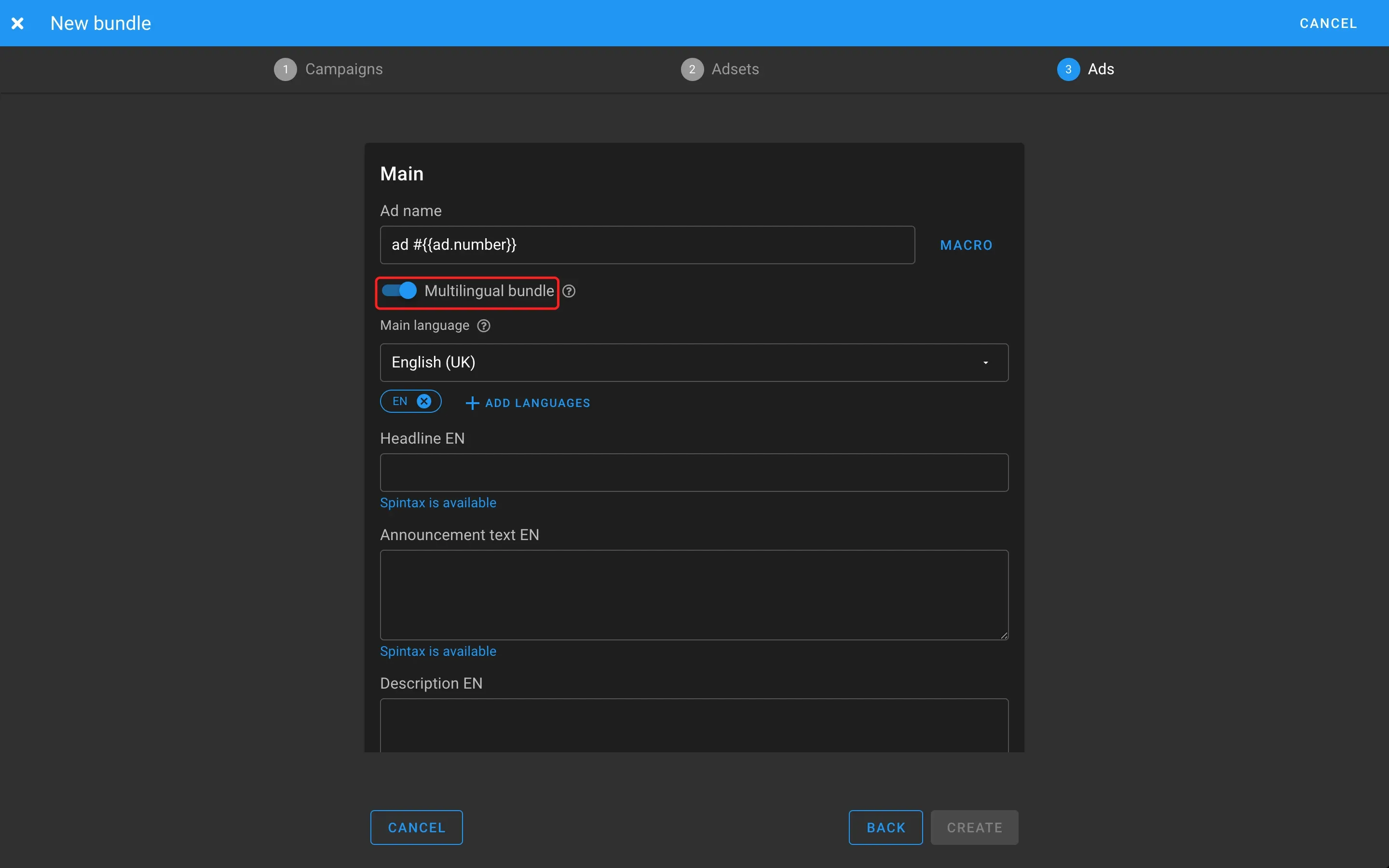
- Turn on “Multilingual bundle” under the “Ad name” field. The language block appears.
What the language block contains
- “Main language”. The base language the bundle is built from.
- Language list. Language codes as chips with a remove button, plus “Add languages”.
- Fields for each language. Headline, ad text and description, each labeled with the language code. All three accept spintax, as the “Spintax is available” hint shows.
- Order. The chip sequence is the order in which Dolphin{cloud} sends the languages at upload. Set it right away.
Spintax is handy for testing copy: phrase variants go in curly braces separated by |, for example {Sale|Discount} up to {30|40}%, and each upload picks one combination.
What comes with every upload
When you upload the bundle, Dolphin{cloud} fills in:
- the set of languages in the given order;
- a headline for each language;
- an ad text for each language;
- a description for each language;
- a deep link for each language if you work with apps.
On the “Creatives” step of the upload wizard the “Languages” toggle is already on, and every ad shows the main language, the language codes and the filled fields.
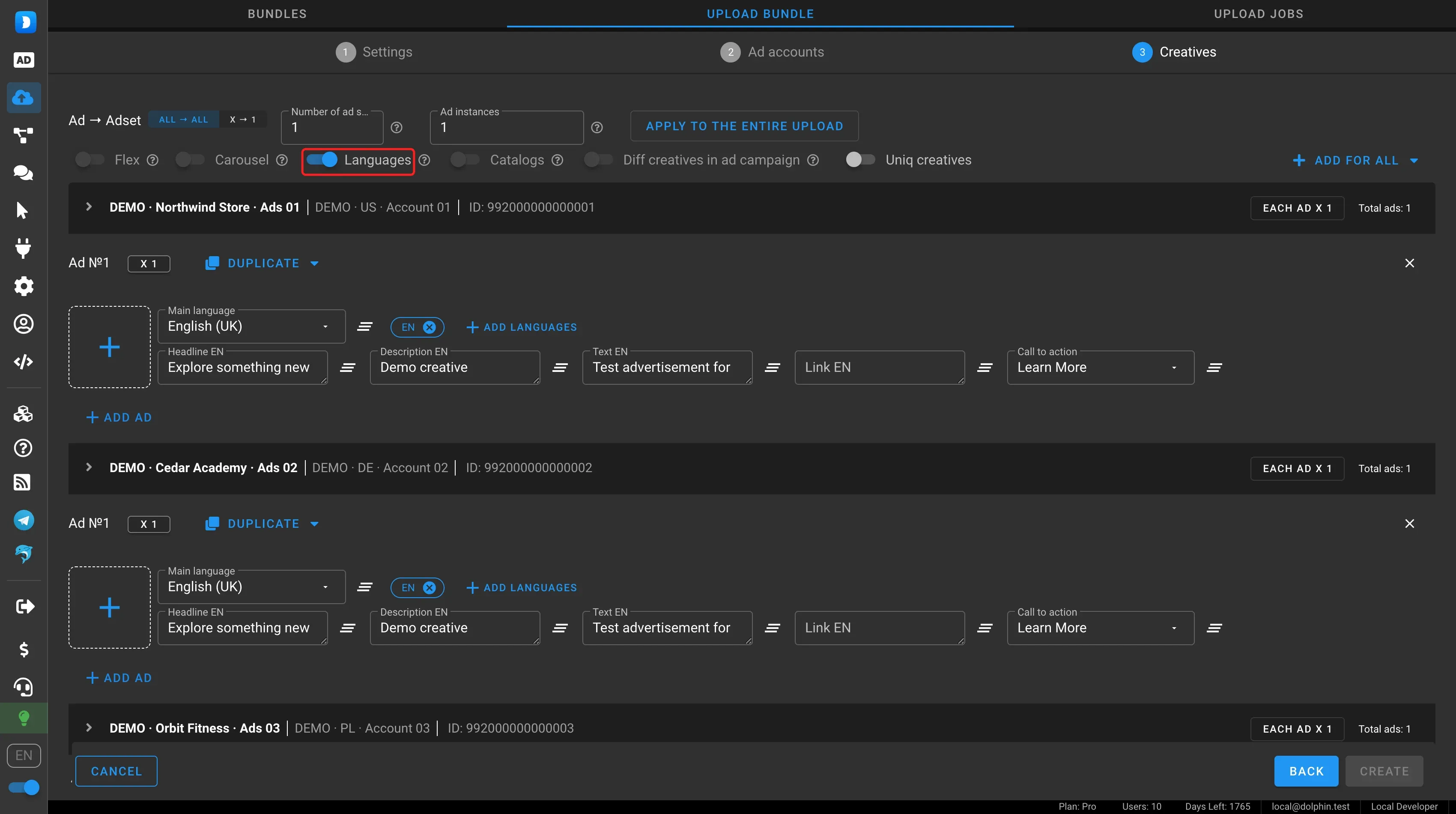
2 more tools on this step cover the rest:
- bulk creative upload for languages. Up to 500 files are spread across ads and languages automatically, see Multilingual Facebook uploads;
- duplicating ads within an ad account or a list of ad accounts when you need more ads per language.
Language order
The service used to lose the order users set. This is fixed: the order is exactly what you set, both for bundle uploads and manual setup.
One Facebook quirk: Ads Manager sometimes shows the languages in reverse. This happens on the Facebook side, not in Dolphin{cloud}, and a re-upload fixes it. You do not need to change the bundle.
When it pays off
- One offer in 5-6 geos. Languages and texts are set once, not before every launch.
- Frequent re-uploads of one bundle. A repeat upload takes as long as a regular one.
- Team work. The language setup lives in the bundle, not in the head of whoever ran the last upload. A teammate can open the bundle and upload it the same way.
If you have fewer creatives than slots, X → 1 distribution helps: see Carousel, X → 1 and re-uploads.
FAQ
Do I need to pick languages again for a re-upload?
No. If languages are set in the bundle, every upload from it gets the same languages in the same order, plus headlines, texts, descriptions and deep links for each language.
What is the main language in a multilingual bundle?
It is the base language of the ad that the bundle is built from. Other languages are added with “Add languages” and filled in separately.
Does spintax work in a multilingual bundle?
Yes, in all three fields (headline, ad text and description) for every language.
Why does Ads Manager show the languages in reverse order?
Facebook itself sometimes displays them that way. Dolphin{cloud} sends the order you set, and a re-upload fixes the display.
How do I make many ads in each language?
Use ad duplication on the “Creatives” step and bulk creative upload for languages.
Summary
A multilingual bundle turns language setup into a one-time job: fill in the bundle and every later upload gets the same setup without manual edits. Create a multilingual bundle in Dolphin{cloud} and compare how long a re-upload takes now. The rest of the spring and summer releases are in What is new in Dolphin{cloud} in spring and summer 2026.